How to disable Messenger (Messaging) in Outlook.com
Last week, Microsoft announced (yet another) rebrand of Hotmail to Outlook.com. It has received plenty of favourable reviews and praise but one feature is extremely annoying – and that is, like the Windows 8 Metro Windows 8-style UI Messaging application, it automatically logs you into Messenger and connected services (Facebook Chat) when you sign in, with no ability to log off instant messaging except for setting your status to “invisible”. (Side note: Windows 8 Messaging now thankfully has a global off switch added into its settings since the Release Preview.)
I’m sure there are people who don’t mind this – perhaps they don’t use instant messaging or they keep webmail open all the time anyway (in fact you get a small bonus feature if you do). I personally use the actual Outlook desktop application and only use webmail when I’m away from my own PC, so I’m not too keen to be speaking of people when I’m just trying to quickly access my email from other locations.
So I looked for a way to disable this from happening and after rummaging through the options unsuccessfully, some searches to see if anyone else had already figured it out, I started looking through the code, and found the key: geo.messenger.services.live.com geo.gateway.messenger.live.com (changed December 2012).
So to disable Outlook.com’s Messaging feature, all one has to do is block this host and the easiest way to do this is to add it to your hosts file. If you’re not sure how to do this or want to save time, I’ve made a quick tool for Windows users below which you can easily run to automatically add (or remove) blocking this host. To make this change yourself manually, you find yourself on a machine without administrator rights, or you use another operating system, see Other Options below.
Download the Disable Outlook.com Messaging tool
Using the tool
To start, download the Disable Outlook.com Messaging tool, open the zip file, and run the application inside. You’ll be prompted for administrator rights so the tool can make modifications to your hosts file, and then you’ll receive a message indicating the change has been made. Please note you’ll need to restart your browser to see the change.
To remove the entry in the hosts file, run the tool again, the messenger entry will be removed and you’ll receive a message notifying you as such.
If required, you can use the /q command line parameter to avoid seeing the notification messages that the change has been added or removed.
After the change
Once the hosts file entry has been added, when you click Messaging in Outlook.com, you will see an attempt to sign in but it never will be successful. With the new Messaging pane added in 2014, you will also need to collapse the Messaging pane by clicking on it: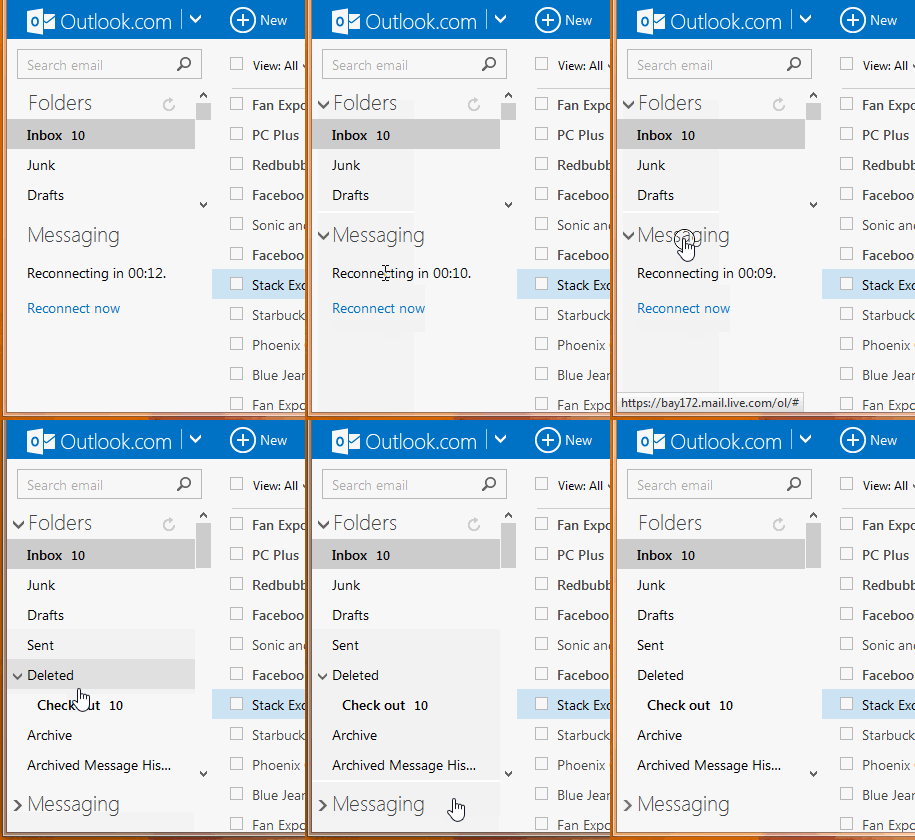
Other options
If you wish to add the entry to the hosts file yourself and use Windows, press the Start button (if you use Windows XP, click the Run option) and type:
notepad %systemroot%\system32\drivers\etc\hosts
then press Ctrl-Shift-Enter to start Notepad with administrator rights. Once Notepad starts, add the following line:
0.0.0.0 geo.gateway.messenger.live.com
Then close Notepad and save. Now just restart your browser to see the change.
If you’re on a Windows machine without the ability to get administrator rights, such as a work setup or library and there is an available version of Internet Explorer available, commenter qiang reminded me that you can use the Restricted Sites zone to block specific hosts like this one. To do so, after starting Internet Explorer, press the Alt key on the keyboard to bring up the menu bar, choose Tools, then Internet Options, then the Security tab, choose Restricted sites and finally press the Sites button. In the ‘Add this website to the zone:’ box, type geo.gateway.messenger.live.com and choose Add. Then click Close, and OK in the remaining open options windows. If outlook.com is already open, sign out outlook.com and sign back in to see the change.
If you’re using another operating system, the How-To Geek has tutorials for both Ubuntu Linux and OS X (the Windows one is missing the fact you need to start Notepad in Administrator mode if you’re following this guide).
Additionally, you could use firewall software to block outgoing connects to this hosts. Unfortunately the built-in Windows firewall only supports IP addresses and since these can change, it isn’t too useful for the purposes of blocking this.
Final notes
As modifying the hosts file requires administrator rights, this probably won’t be successful on machines you might use when you’re out and about. Of course, the best solution would be for Microsoft to add this feature into Outlook.com itself and in fact, the web messenger in Hotmail initially didn’t allow you to log out either but the feature was added later on. I certainly have no idea why is was deemed unimportant to be included in the current release of Outlook.com and it seems many of you agree with me.
Posted on August 7, 2012, in Messenger, Messenger Tools, Outlook.com, Tools, Uncategorized. Bookmark the permalink. 120 Comments.
 Jonathan Kay, MessengerGeek
Buon giorno,io non sono un’esperta di PC, da sempre ho avuto come indirizzo Mail, Hotmail, ora mi dicono che Hotmail non
non è più valido.Non so proprio come fare!
il mio indirizzo Mail era ociorios@hotmail.it, un mio amico lo ha cambiato in: ociorios.12@Gmail.com.
Nel ringraziarvi dell’aiuto che mi darete, vi auguro una bellissima Giornata.
Giovanna ferrario.
Hi, I installed “Download the Disable Outlook.com Messaging tool” but I want to uninstall it and can’t find it under my installed programs. How do you uninstall this?
Hi, Never mind, I found the answer in previous reply that you did. Just run the Exe again and it will undo itself.
This worked great, thanks! I entered 0.0.0.0 geo.gateway.messenger.live.com using Admin rights
Hooray! Those dumb photos were annoying the heck out of me – pictures of people I don’t know – since I’m not on ANY of the social media.
Thank you, thank you, thank you!
Tried this but don’t like the changes. Now I still have the annoying Messaging rubbish in the bottom left corner, that is forever trying to load, and counting down the seconds before it is able to try to load (and fail). Worse than a few stupid images I had before.
Greetings Derek. You need to collapse the Messaging pane by clicking on it. I’ve modified the article to include an animation on how this is done.
Thanks very much. This is the solution I have been searching for.
Okay but this still leaves a block saying “Messaging” that cover real estate I would rather see. Can this pane be zapped somehow?
Greetings Pete. As Outlook.com uses HTTPS, the only way to do what you’re asking is to the modify the web page using Add-ons/Extensions in your browser (such as Greasemonkey). Just playing around with the page in Firefox’s F12 developer tools, I was able to modify the page to make this pane completely disappear pretty quickly, so if you’re not interested in messing around with that yourself, I’ll see what I can come up with another time.
You can also use Adblock’s Element Hider by highlighting the lower left pane that says “Messaging” and creating a new element rule for it
Another way to block geo.gateway.messenger.live.com is by using a router, wired or wireless. Most routers have the option to block any website for you. Easy to add and easy to remove any site. This will work for any browser. In the original article there’s a reference to using Options in Internet Explorer and it’s Restricted sites zone. Maybe there are ways to do the same in other browsers.
https://profile.live.com/cid-0383f3b0a657d703/Services/?success=false
Thank you so much! I really appreciate you including an easy tool for people to use, as well as instructions in the “Other Options” setting, which I used. All I had to to was copy and paste the 0.0.0.0 geo.gateway.messenger.live.com into the notepad that opened. Such an easy fix to my problem, of my internet email also signing me into messenger. Thank you for taking the time to explain in such a well-organized and clear post. Much appreciated. 🙂
Fantastic !!! its gone ,,, good riddance . thank you Jonathon . Now all I need to do is lose Skype .
Jonathan, Thank you so much for this great fix! It has been so annoying to have Messenger take up space in my in-box and I never use it.
does this program work on all computers, such as if i log onto another computer, will the program still have disabled messenger?
Greetings Ken. Unfortunately not, it’s a local computer change, not a server one.
Thanks for this solution, you are awesome
Fantastic ,,, Its so easy when you have it explained in such simple to understand terms ,,, thanks ,,
I don’t suppose you can help with getting rid of that popup at the bottom of the screen in outlook from Microsoft . It keeps on asking to join facebook and it keeps coming back at every email page . I am sick and tired of having to “close ” it every time I view an email .
tks again
Johathan, I used your suggestion some time ago, and it worked. Thank you !! The method I used was by manually (myself) adding the entry to the hosts file “0.0.0.0 geo.gateway.messenger.live.com” via Notepad. Something recently has changed, and this no longer works. The problem now re-occurs. It seems that Microsoft caught on to this, and maybe they changed the code/key. If you can update this VERY nice thread, so that this can work once again, that would be helpful to so many people.
In the meantime, I am using your other suggestion which is to add “geo.gateway.messenger.live.com ” into the Restricted Sites in I.E. This method does continue to work, but I think this method will only work if someone is using Internet Explorer to open their Hotmail/Outlook email.
where did this download go page does not exist
where did the download for Download the Disable Outlook.com Messaging tool go ?
Doesn’t seem to work for me, I tried it and logged into my hotmail but the damn green bar still seems to be there and its logging me in automatically still
You need to be a part of a contest for one of
the greatest websites on the internet. I
will recommend this website!
Es perfecto tiempo para hacer planes para el futuro y es tiempo para serr feliz.
Tengo leer este pozt y si pudiera me querer sugiero que pocos
algunas cosas interesantes o Consejos. Quizás podría Puede escribir próximos artículos se refieren a
este artículo. I quiero aún más cosas sobre él!
Here are instructions on how to disable skype in the new outlook.com
https://www.raymond.cc/blog/disable-outlook-automatically-login-messenger/